Free, no sign-up for files up to 2 MB
MP3 to QR Code
Upload an MP3 or another audio file and get a QR code that plays it on any phone. Print it on a card, a label or a poster.
- Free
- Plays on any phone
- No app needed
Your audio link
Your QR code
Scanning it opens the same link. Sign in before you print it: until then, the link and this QR code stop working after about 15 minutes. An account is free.
Download QR code (PNG)This audio file is over 2 MB.
An MP3 at normal quality is about 1 MB a minute. Create an account and upload it there. A new account gets Pro free for 7 days, no card. After that, the Free plan holds 5 MB and Starter ($8 a month) holds 500 MB.
Create a free account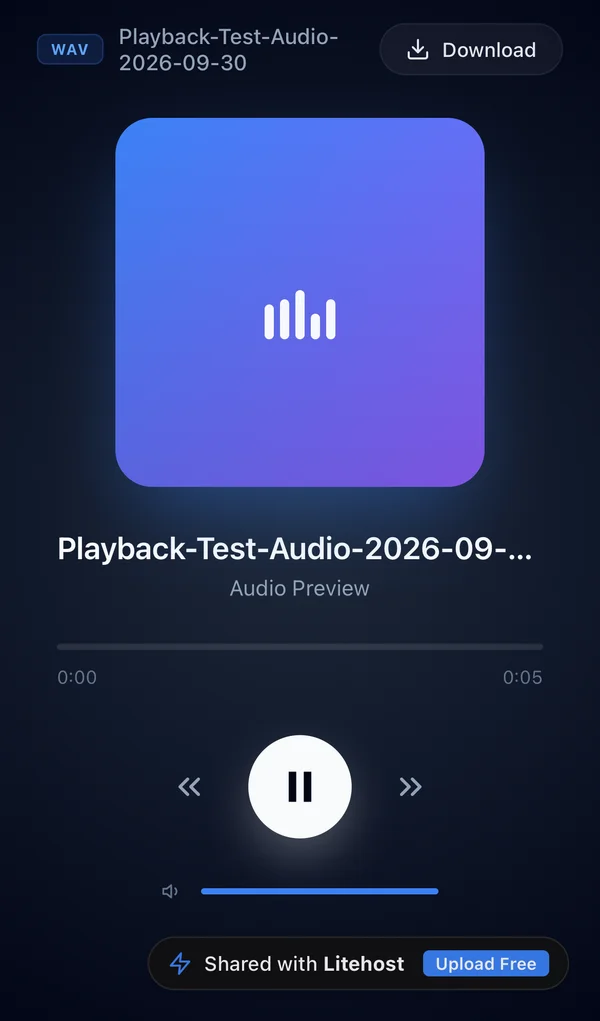
How it works
How to make a QR code for an MP3
- 1
Drop your audio file
MP3, WAV, M4A and more. Drag it into the box, or tap Choose audio file on your phone.
- 2
Sign in to keep it
Before you print, sign in so the link behind the QR code stays online.
- 3
Download the QR code
Save the PNG and put it on your card, label, poster or booklet.
Ideas
What people put behind an audio QR code
A voice message on a card
Add a recorded greeting to a gift, a wedding card or an invitation.
An audio guide
Put a QR code next to a piece in a gallery, a shop or a tour stop.
A demo or a track on merch
Print it on a flyer, a sticker or a CD sleeve so people can listen right away.
A lesson or a practice track
Add it to a worksheet or a songbook so students can play it on their phone.
Only need a link to send in a message? Use MP3 to Link.
Plans
How long the QR code works
This page, no account
About 15 minutes
Up to 2 MB, about 2 min of MP3
Enough to try it. Sign in from the result to keep the link.
Free account
While people scan it
5 MB, about 5 min of MP3
Scanned at least once every 90 days. Shows a small Litehost badge.
Starter, $8 a month
Doesn't expire
500 MB of storage
No badge, a password, and more projects.
A new account gets Pro free for 7 days, no card. Prices and limits as of October 2026. See all plans
FAQ
Common questions
Is this audio QR code generator free?
Yes. Without an account you can upload an audio file of up to 2 MB and download its QR code. The link behind it lasts about 15 minutes until you sign in. On a free account it stays online while it's opened at least once every 90 days, and shows a small Litehost badge.
Will the QR code stop working?
The QR code opens your audio's link, so it works while the link is online. Sign in before you print it: a link you don't keep stops working after about 15 minutes. On a free account, a link nobody opens for 90 days is paused; on Starter it stays online.
What does the person who scans it hear?
A player page opens in their phone's browser with play, 10 seconds back and forward, and a Download button. No app, no account. On Pro you can hide the Download button.
How long can my audio be?
It depends on the file size. An MP3 at normal quality (128 kbps) is about 1 MB a minute, so 2 MB is about 2 minutes. A free account holds 5 MB, about 5 minutes. Starter ($8 a month) holds 500 MB. A WAV is about ten times bigger than the same MP3.
Why not put the audio itself in the QR code?
A QR code holds about 3 KB, far less than any recording. Every audio QR code works the same way: the file is stored online and the QR code holds its link. That's why the link has to stay online for the QR code to keep working.
What size should I print it?
The PNG is 1024 × 1024 pixels, enough for a card, a label or a poster. Keep the white border around it, and print it at least 2 cm (about 0.8 in) wide.
Free tools
More free tools
- PDF to Link Upload a PDF and get a link that opens it on any phone or computer. Open tool
- PDF to QR Code Upload a PDF and download a QR code that opens it, ready to print. Open tool
- Upload HTML Upload an HTML file and get a link that opens it as a page on any phone. Open tool
- MP3 to Link Upload an audio file and get a link that plays it on any phone or computer. Open tool
- Image to QR Code Upload a photo or a JPG and download a QR code that opens it, ready to print. Open tool
- Resume Link Upload your PDF resume and get a link to share. Update it later, keep the link. Open tool
- Video to Link Upload a video and get a link that plays it on any phone or computer. Open tool
- Video to QR Code Upload a video and download a QR code that plays it on any phone. Open tool