Free, no sign-up for PDFs up to 2 MB
PDF to Link
Upload a PDF and get a shareable link that opens it in any browser, on a phone or a computer. Paste it in an email, a message or your bio.
- Free
- Opens on any phone
- No app needed
Your PDF link
This link lasts about 15 minutes. Sign in to keep it: a new account gets Pro free for 7 days, no card.
This PDF is over 2 MB.
Create an account and upload it there. A new account gets Pro free for 7 days, no card. After that, the Free plan holds 5 MB and Starter ($8 a month) holds 500 MB.
Create a free account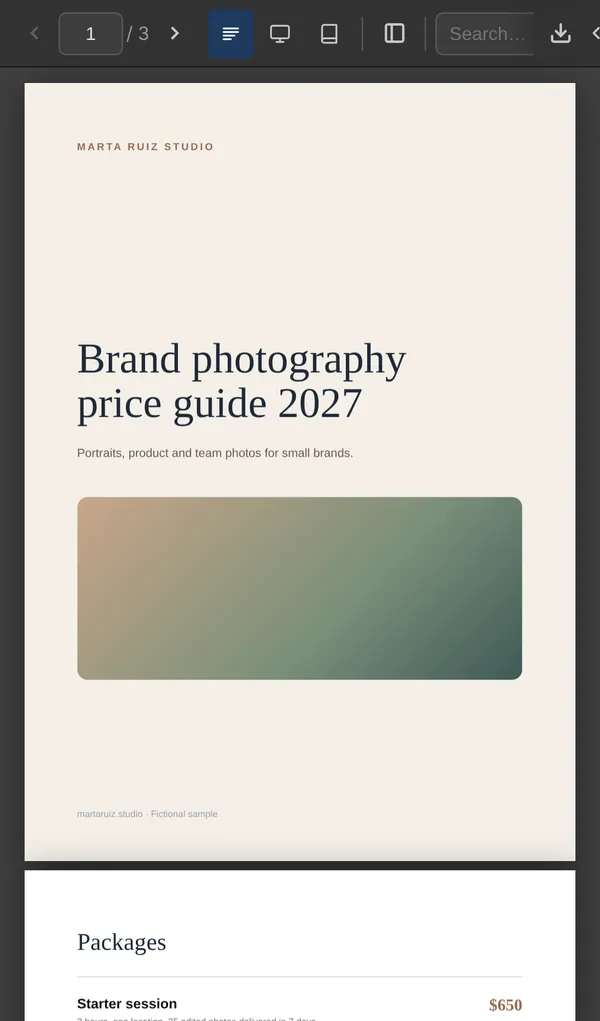
How it works
How to turn a PDF into a link
- 1
Drop your PDF
Drag it into the box, or tap Choose PDF on your phone. Up to 2 MB without an account.
- 2
Open the link
Check it the way the other person will see it, before you send it.
- 3
Send it
Copy the link into an email, a message or your bio. Sign in to keep it longer than 15 minutes.
Ideas
What people share as a PDF link
A price guide in your bio
One link in your Instagram bio and in replies to enquiries.
A proposal or quote
Send the client a link instead of a heavy attachment.
A report or a deck
Export it to PDF and send one link that opens on their phone.
A menu or a flyer
Print a QR code for the link and replace the PDF when prices change.
For the other person
What people see when they open your PDF link
Opens on any phone
The PDF opens in the browser. Nobody needs an account or an app.
A Download button
They can read it online or save the original file.
Slides stay slides
A landscape PDF, like a deck exported to PDF, opens one slide at a time. A portrait PDF scrolls page by page.
Replace it, keep the link
Signed in, replace the PDF and the link stays the same. Watch it (37 s).
Plans
How long the link lasts
This page, no account
About 15 minutes
PDFs up to 2 MB
Enough to try it. Sign in from the result to keep the link.
Free account
While people open it
5 MB of storage
Opened at least once every 90 days. Shows a small Litehost badge. Replace the PDF and the link stays the same.
Starter, $8 a month
Doesn't expire
500 MB of storage
No badge, a password, and more projects.
A new account gets Pro free for 7 days, no card. Prices and limits as of October 2026. See all plans
When a Google Drive link is enough
If the PDF is already in Google Drive, OneDrive or Dropbox and your account can share outside your organization, set it to "Anyone with the link" and send that. Open it in a private window first: if it asks for a sign-in, the other person will see the same thing.
A separate PDF link helps when the file shouldn't depend on how you organize your drive, or when you'll replace it later. Our guide on how to create a link to a PDF covers Drive, OneDrive, Dropbox and your own website.
FAQ
Common questions
Is this PDF link generator free?
Yes. Without an account you can make a link to a PDF of up to 2 MB, and it lasts about 15 minutes. Sign in to keep it. A new account gets Pro free for 7 days, no card. After that, a link on the Free plan stays online while it's opened at least once every 90 days, and shows a small Litehost badge.
Does the person I send it to need an account?
No. A public Litehost link opens in the browser on a phone or a computer, with a Download button.
What's the largest PDF I can link?
2 MB without an account. With an account, the limit is your plan's storage: 5 MB on Free, 500 MB on Starter and 5 GB on Pro.
Can I change the PDF without changing the link?
Yes. Sign in, open the project and replace the PDF. The link stays the same and shows the new file. Copies people already downloaded don't change.
Can I put a password on the PDF link?
Yes, on Starter and above.
Does it convert my PDF to a URL?
It doesn't change your PDF. It gives the file its own web address (URL), like price-guide.litepage.site. Paste it in an email, a message, your bio or a button on your website, or put it behind words as a hyperlink.
How do I add a clickable link inside a PDF?
That's a different job: you add it in a PDF editor or in the app you wrote the document in. Our guide on creating a link to a PDF explains both.
Printing it? Make a QR code for your PDF. Sending a PDF to a client? Read how to send a PDF to a client.
Free tools
More free tools
- PDF to QR Code Upload a PDF and download a QR code that opens it, ready to print. Open tool
- NewUpload HTML Upload an HTML file and get a link that opens it as a page on any phone. Open tool
- MP3 to Link Upload an audio file and get a link that plays it on any phone or computer. Open tool
- Image to QR Code Upload a photo or a JPG and download a QR code that opens it, ready to print. Open tool