Free, no sign-up for files up to 2 MB
MP3 to Link
Upload an audio file and get a link that plays it in the browser. Send it in a message; the listener taps it and presses play.
- Free
- Plays on any phone
- No app needed
Your audio link
This link lasts about 15 minutes. Sign in to keep it: a new account gets Pro free for 7 days, no card.
This audio file is over 2 MB.
An MP3 at normal quality is about 1 MB a minute. Create an account and upload it there. A new account gets Pro free for 7 days, no card. After that, the Free plan holds 5 MB and Starter ($8 a month) holds 500 MB.
Create a free account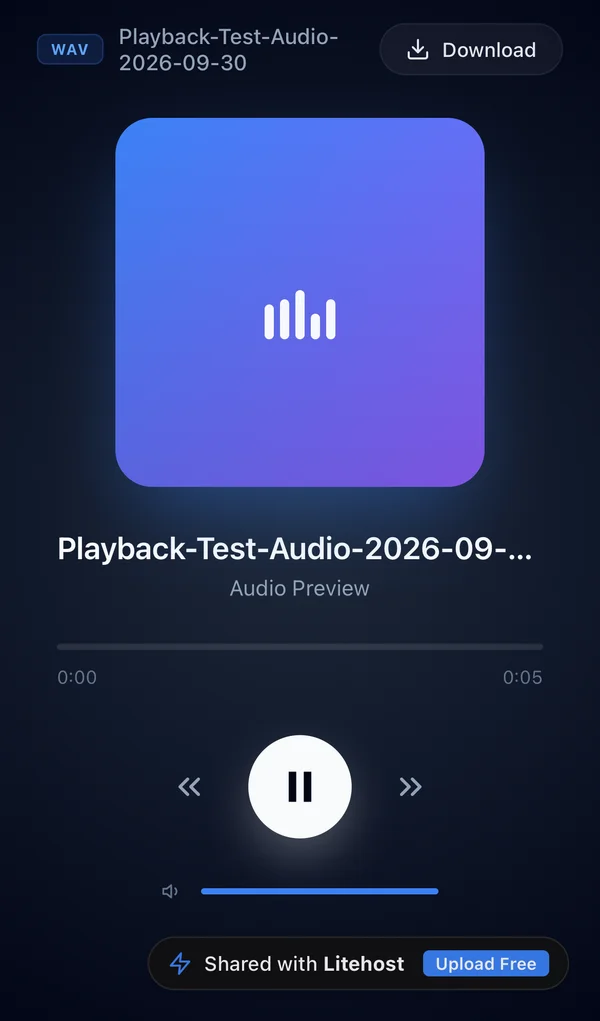
How it works
How to turn an MP3 into a link
- 1
Drop your audio file
Drag it into the box, or tap Choose audio file on your phone. Up to 2 MB without an account.
- 2
Copy the link
Paste it in a message, an email or a chat. It opens a player in the browser.
- 3
Sign in to keep it
Without an account the link stops working after about 15 minutes. Signing up is free.
Ideas
What people send as an audio link
A voice note for a client
Explain a change out loud and send one link instead of a long email.
A demo track or a mix
Send it to a band, a client or a label to listen on their phone.
A podcast or voice-over draft
Get feedback before you publish, without uploading it anywhere public.
A lesson or a practice track
Send students a recording they can replay on the bus.
Plans
How long the link works, and how much audio fits
This page, no account
About 15 minutes
Up to 2 MB, about 2 min of MP3
Enough to try it. Sign in from the result to keep the link.
Free account
While people open it
5 MB, about 5 min of MP3
Opened at least once every 90 days. Shows a small Litehost badge.
Starter, $8 a month
Doesn't expire
500 MB of storage
No badge, a password, and more projects.
Minutes assume an MP3 at 128 kbps. A new account gets Pro free for 7 days, no card. Prices and limits as of October 2026. See all plans
FAQ
Common questions
Is it free to turn an MP3 into a link?
Yes. Without an account you can upload an audio file of up to 2 MB, and the link lasts about 15 minutes. Sign in to keep it. A new account gets Pro free for 7 days, no card. After that, a link on the Free plan stays online while it's opened at least once every 90 days, and shows a small Litehost badge.
How long can my audio be?
It depends on the file size, not the length. An MP3 at normal quality (128 kbps) is about 1 MB a minute, so 2 MB is about 2 minutes. A free account holds 5 MB, about 5 minutes. Starter ($8 a month) holds 500 MB. A WAV is about ten times bigger than the same MP3.
What does the person who opens the link see?
A player page with play, 10 seconds back and forward, volume and a Download button. It opens in the browser, so they don't need an app or an account.
Which formats work?
MP3, WAV, M4A, AAC, OGG, FLAC, OPUS, AIFF and WMA. Litehost doesn't convert the file: the listener's browser plays it as you uploaded it. MP3 is the safest choice, because every current phone and computer browser plays it. FLAC, AIFF and WMA don't play in some browsers.
Is this a direct link to the MP3 file?
No. The link opens a player page made for people to listen to and download. If you need a raw file address to put inside an app or another site's audio player, this tool isn't built for that.
Can people download the file?
Yes, with the Download button, and they get the original file. On Pro you can hide the button.
Free tools
More free tools
- PDF to Link Upload a PDF and get a link that opens it on any phone or computer. Open tool
- PDF to QR Code Upload a PDF and download a QR code that opens it, ready to print. Open tool
- NewUpload HTML Upload an HTML file and get a link that opens it as a page on any phone. Open tool
- Image to QR Code Upload a photo or a JPG and download a QR code that opens it, ready to print. Open tool